Blog

  • कैसे अपने लैपटॉप को बिना नया खरीदे तेज़ करें

    कैसे अपने लैपटॉप को बिना नया खरीदे तेज़ करें

    Frustrated person staring at a slow laptop with speed and performance graphs in the background.

    स्टार्टअप प्रोग्राम्स को बंद करें – शुरू होने से पहले ही सफाई कर लें

    कभी सोचा है कि आपका लैपटॉप चालू होते ही आलसी क्यों लगता है? इसका कारण ये है कि ये बैकग्राउंड में कई सारे एप्लिकेशन ओपन कर रहा होता है। इनमें से आधे तो आपने खुद नहीं खोले होते। जैसे, आपने सिर्फ क्रोम खोला और साथ में ज़ूम क्यों स्टार्ट हो गया?

    कभी घबराएं नहीं, बस ये करें:

    • Ctrl + Shift + Esc दबाकर Task Manager खोलें
    • Startup टैब में जाएं
    • जो भी ऐप्स आपको अभी जरूरी नहीं हैं, उन पर राइट क्लिक करके Disable कर दें

    टिप: अपना एंटीवायरस और सिस्टम से जुड़े प्रोग्राम्स ऑन रखें। बाकी, जो एक्स्ट्रा हैं, वो हटा दें।

    पुराने ऐप्स हटाएं – जैसे वो गेम जो आपने 2019 में एक बार खेला था

      हम सबके पास ये आदत होती है कि पुराने ऐप्स “शायद काम आ जाएं” टाइप रखे रहते हैं। लेकिन सच ये है कि ये ऐप्स बस लैपटॉप को स्लो करते रहते हैं।

      तो, थोड़ी सफाई कर लें:

      • Settings > Apps > Installed Apps में जाएं
      • वो ऐप्स चेक करें जिन्हें आपने महीनों से नहीं खोला
      • इन्हें बिना सोचे-समझे अनइंस्टॉल कर दें

      अगर किसी प्रोग्राम को लेकर आपको कंफ्यूज़न हो, तो पहले गूगल पर चेक कर लें। सेफ रहना ही बेहतर है।

      टेम्परेरी फाइल्स डिलीट करें – लैपटॉप को ताजगी का अहसास दिलाएं

      जैसे हम पुराने कागज़ और बिल्स कचरे में डालते हैं, वैसे ही लैपटॉप भी समय-समय पर बेकार फाइल्स जमा कर लेता है। ये “टेम्परेरी” फाइल्स किसी काम की नहीं होतीं, बस जगह घेरती हैं।

      इनसे छुटकारा पाएं:

      • Windows + R दबाएं, temp टाइप करें और Enter दबाएं
      • वहां जो भी फाइल्स दिखें, उन्हें डिलीट कर दें
      • फिर %temp% और prefetch में भी यही करें

      अच्छा लगता है, है ना? जैसे दिन भर की थकान के बाद लैपटॉप को आराम का अहसास हो।

      सिस्टम को अपडेट रखें – वो irritating अपडेट्स असल में मदद करते हैं

      हां, Windows अपडेट्स हमेशा बुरे समय पर आते हैं। मीटिंग से पहले या ऑनलाइन एग्ज़ाम से ठीक पहले। लेकिन इन्हें स्किप करने से सिस्टम और स्लो हो जाता है।

      ये करें:

      • Settings > Windows Update में जाएं
      • Check for Updates पर क्लिक करें
      • ड्राइवर अपडेट करने के लिए Device Manager में जाएं, मैन्युअली अपडेट करें या Driver Booster जैसे टूल्स का इस्तेमाल करें

      अपडेट्स वैसे ही होते हैं जैसे नीम का कड़वापन – आपको पसंद नहीं आते, लेकिन काम जरूर करते हैं।

      अगर हो सके, SSD पर स्विच करें – स्पीड के लिए सबसे बेहतरीन अपग्रेड

        ठीक है, ये थोड़ा महंगा हो सकता है। लेकिन अगर आप ₹2000-3000 बचा सकते हैं, तो SSD इंस्टॉल करना पुराने स्कूटर में Bullet इंजन डालने जैसा है।

        ये धीमे लैपटॉप्स को भी जैसे नया बना देता है। बूट-अप टाइम घट जाता है, मल्टीटास्किंग भी स्मूद हो जाती है, जैसे देसी घी में रोटियां।

        अगर पैसों की तंगी है तो कोई बात नहीं। लेकिन अगर थोड़ा अतिरिक्त बजट है, तो इसे ट्राय करें।

        मैलवेयर चेक करें – छिपे दुश्मन आपकी स्पीड घटाते हैं

        कभी कभी लैपटॉप स्लो, हैंग और फैन शोर करता है, लेकिन कोई वायरस पॉप-अप नहीं आता। फिर भी कुछ गलत है। ये है मैलवेयर, जो चुपके से बैकग्राउंड में काम कर रहा होता है।

        कोई रिस्क मत लें:

        • Windows Defender या Malwarebytes जैसे भरोसेमंद टूल्स से एक पूरा स्कैन करें
        • हर हफ्ते एक बार स्कैन करना न भूलें
        • और हां, संदिग्ध फाइल्स या पायरेटेड मूवीज़ डाउनलोड करने से बचें (हम सबने एक बार जरूर किया है)

        फैंसी विजुअल्स को कम करें – चमकदार इफेक्ट्स हमेशा अच्छे नहीं होते

        Windows में बहुत सारे एनिमेशन्स होते हैं – ओपन, क्लोज, शैडो, ज़ूम, आदि। अच्छा लगता है, लेकिन ये स्पीड को खा जाते हैं।

        इन्हें कम करने के लिए:

        • This PC पर राइट क्लिक करें > Properties > Advanced System Settings
        • Performance में जाएं, Settings पर क्लिक करें
        • Adjust for best performance चुनें (या जो भी आपको जरूरी नहीं हो, वो हटा दें)

        आपका स्क्रीन थोड़ा सादा दिखेगा, लेकिन लैपटॉप की स्पीड बढ़ जाएगी।

        डेस्कटॉप को साफ करें – हां, ये गड़बड़ भी स्पीड को घटाती है

        आपने डेस्कटॉप पर सब कुछ रखा हुआ है – फोटो, डॉक्यूमेंट्स, प्रोजेक्ट फोल्डर्स, यहां तक कि 2017 से शॉर्टकट्स भी।

        अब समय है साफ करने का:

        • एक्स्ट्रा फाइल्स को फोल्डर्स में डालें
        • सिर्फ 3-4 महत्वपूर्ण आइकन्स बाहर रखें
        • स्लाइडशो वॉलपेपर को भी बंद कर दें। ये कूल तो लगता है, लेकिन RAM खाता है।

        कम गड़बड़ = तेज़ लोडिंग।

        लैपटॉप को सही तरीके से रीस्टार्ट करें – सिर्फ स्लीप मोड पर न छोड़ें

        हममें से बहुत लोग बस लैपटॉप बंद करने के बजाय lid बंद कर देते हैं। लेकिन ऐसा करने से बैकग्राउंड में प्रोसेस चढ़ते जाते हैं।

        आदत डालें:

        • हर 2-3 दिन में लैपटॉप को रीस्टार्ट करें
        • ये मेमोरी को क्लियर करता है और सिस्टम को रिफ्रेश करता है

        इसे ऐसे समझें जैसे हम अपने पैरों को धोकर आराम से सोते हैं—लैपटॉप के लिए भी वही काम करता है।

        अंतिम शब्द – अपने लैपटॉप को अभी नहीं छोड़ें

        देखिए, हर लैपटॉप प्रॉब्लम का मतलब ये नहीं कि नया लैपटॉप खरीदना है। कभी-कभी थोड़ा सफाई, कुछ छोटा सा उपाय और थोड़ी देखभाल से पांच साल पुराना लैपटॉप भी नया जैसा चलने लगेगा।

        तो अगली बार जब लैपटॉप स्लो लगे, तो किस्मत को दोष मत दें। ये स्टेप्स अपनाएं और देखिए जादू।

        🔗 संबंधित लेख जो आपको पसंद आ सकते हैं:

        अगर बिना एक रुपया खर्च किए लैपटॉप की स्पीड बढ़ाना जीत जैसा लगा, तो हमारी पोस्ट “भारत में ₹30,000 के अंदर बेस्ट बजट लैपटॉप – 2025” भी जरूर देखें। अगर आप बिना ज्यादा खर्चे के लैपटॉप अपग्रेड करने का सोच रहे हैं, तो ये आपके लिए परफेक्ट है।

        और अगर आपको आसान तकनीकी हैक्स पसंद हैं, तो “2025 के 10 जरूरी टेक गैजेट्स” को जरूर चेक करें। दोनों गाइड्स आपको बेस्ट परफॉर्मेंस दिलाने में मदद करेंगी, बिना किसी कंप्यूटर डिग्री के—और बिना नई वॉलेट के।


      1. Diesel vs Petrol vs Electric Cars in India (2025)

        Diesel vs Petrol vs Electric Cars in India (2025)

        Indian man comparing three cars – one diesel, one petrol, and one EV – with fuel pumps and a charging station in the background, with a confused expression.


        You know, for the longest time, buying Electric Cars in India has felt like solving a never-ending puzzle. Diesel? Petrol? Or should we just take the electric route and go all-in on the future?

        Now that it’s 2025, the confusion has only grown bigger. Fuel prices shoot up without warning, electric charging stations are popping up everywhere, and diesel cars are slowly being pushed out of big cities. So obviously, the big question is — which type of car actually helps you save money in the long run?

        Let’s not just talk numbers on paper — let’s talk real-life stuff like cost, comfort, maintenance, resale, and even the environment.

        💰 Initial Cost: EVs Still Burn a Slight Hole in Pocket

        Let’s be honest — for most of us, the first thing we check is the on-road price. Especially when every rupee counts, that first cost pinches the most.

        Car TypeExample ModelStarting Price (Ex-Showroom)
        PetrolMaruti Baleno₹6.7 lakh
        DieselKia Sonet Diesel₹9.8 lakh
        ElectricTata Tiago EV₹8.7 lakh

        See, electric cars still cost a bit more upfront. That’s mostly because of the battery — it’s like the “heart” of an EV and quite an expensive one. Earlier, diesel cars used to be costlier than petrol ones, but thanks to strict rules and fewer diesel options now, that gap has narrowed.

        ⛽ Fuel Cost: EVs Leave the Others Far Behind

        This is where electric cars start to make real sense.

        Vehicle TypeFuel Cost/km (Approx.)Annual Running Cost (15,000 km/year)
        Petrol₹7/km₹1,05,000
        Diesel₹6/km₹90,000
        Electric₹1.2/km₹18,000

        Now think about this — if you drive regularly, an EV can save you over ₹4 lakh in five years compared to petrol. Even diesel will cost you ₹3.5 lakh more. That’s not small money. You could easily take a family vacation or even part-pay a new scooter with that saving.

        🔧 Maintenance: EVs are Like “No Tension” Vehicles

        When it comes to regular upkeep, electric cars are just… simpler.

        Petrol and diesel cars need frequent oil changes, filters, and clutch replacements. It’s part of the deal. But EVs? Hardly any moving parts. No engine oil. No clutch. Less chance of something breaking down.

        Vehicle Type5-Year Avg Maintenance Cost
        Petrol₹60,000 – ₹90,000
        Diesel₹70,000 – ₹1,00,000
        Electric₹15,000 – ₹30,000

        So yeah, EVs are up to 70% cheaper to maintain in the long run. Imagine skipping those regular garage visits — sounds peaceful, right?

        🛞 Driving Feel: What’s It Like on the Road?

        Let’s talk about how it feels behind the wheel. Because driving isn’t just numbers — it’s an experience.

        Petrol Cars:
        Smooth, light, and peppy. Great for daily drives in the city. You don’t get that push-pull feel, but it’s refined.

        Diesel Cars:
        Strong on torque — which means better for highways or carrying heavier loads. But a bit noisy, and not so great for short city drives (they don’t like traffic jams).

        Electric Cars:
        One word — instant. Instant torque, instant pickup. Completely silent, no gears. Feels very modern. Especially fun in stop-go traffic.

        So if you enjoy driving and want something new-age, EVs bring a smile to your face.

        ⛽ Charging vs Refuelling: Who Wins?

        Petrol/Diesel:
        No fuss. Pull in, fill up in 5 minutes, and off you go. You’ll find pumps even in small towns.

        EVs:
        At home, charging takes 6–8 hours.
        Fast-chargers? Around 45 mins to 1 hour.
        Not ideal for highway trips yet, especially in remote areas.

        If you’re someone who mostly drives in the city and has a charging point at home, EVs are super convenient. But for folks doing regular long trips, petrol or diesel still has the edge — for now.

        🌱 Environmental Side: EVs Are Way Cleaner

        We all can feel it — the air in cities is getting worse. Pollution levels are scary. That’s where EVs really step up.

        • Diesel: Heavy emissions, especially the harmful NOx gases
        • Petrol: A bit better, but still pollutes
        • Electric: No emissions while driving (though depends on electricity source)

        If you care about the future — yours and your kids’ — EVs clearly help breathe easier.

        🔄 Resale Value: What Happens After 5 Years?

        Petrol Cars:
        Still doing well. Easy to sell, especially in smaller towns or tier-2 cities.

        Diesel Cars:
        Struggling. With bans already in Delhi NCR and more coming, resale is dropping.

        Electric Cars:
        A surprise winner. Battery warranties and more awareness mean second-hand EVs are in demand.

        EV resale may not be at its peak yet, but it’s rising — faster than many expected.

        📊 So, What’s the Final Math?

        Let’s break it down simply. Here’s a 5-year ownership cost for each type:

        TypeInitial CostFuel CostMaintenanceTotal Cost (Approx.)
        Petrol₹7 lakh₹5.25 lakh₹70,000₹12.95 lakh
        Diesel₹9 lakh₹4.5 lakh₹90,000₹14.4 lakh
        Electric₹9 lakh₹90,000₹30,000₹10.2 lakh

        Winner: Electric — lowest cost in the long run
        Diesel — losing favour, especially in cities
        🟡 Petrol — safe choice, but not future-ready

        If you are intrested in electic cars this blogs will surely help you
        Top 5 Budget Electric Cars in India (2025)
        Check EV policies by state (Government Source)

        If you are intrested not electic cars this blogs is for you:
        Latest fuel prices across Indian states
        Compare car loan interest rates in India

      2. Solo Travel Tips Every First-Time Explorer Should Know

        Solo Travel Tips Every First-Time Explorer Should Know

        A young solo traveller with a backpack, walking alone on a mountain trail during sunset with a scenic background – peaceful, adventurous vibe

        There’s something special about going on your first solo travel trip. It’s exciting, sure, but also a bit scary. You’re on your own walking around a new place, eating alone, figuring things out by yourself. Some moments feel peaceful, some feel confusing. But that’s the fun of it.

        Let’s be honest, solo travel isn’t always picture-perfect. It’s not just beaches and sunsets. Sometimes it’s getting lost, or sitting quietly in a café not knowing what to do next. But if you’ve been thinking about going on a solo trip for the first time, this might help. No fancy advice here, just simple talk.

        Why Even Travel Alone?

        Think about it. When you go with others, the trip becomes a group story. When you go alone, it becomes your own story. You notice small things more. You feel proud when you figure something out without help like reading a signboard in another language, or finding your hostel without asking ten people.

        And the best part? You start feeling okay with being alone. You enjoy your own company. It’s like getting to know yourself better, but while walking through a street market or watching the sunset from a quiet hill.

        Tips That Actually Help (From People Who’ve Done It)

        Start with a Comfortable Place

        You don’t have to fly across the world. Pick a place that’s safe and easy to travel maybe a popular destination where lots of solo travellers go. Somewhere with good transport, English signs, and friendly locals.

        Pack Only What You’ll Use

        One big mistake? Overpacking. Remember, you’re the one carrying everything. Pick clothes that match with each other. Carry basic medicines, a power bank, and photocopies of your ID. Keep it light your back will thank you later.

        Plan Less, Feel More

        It’s good to know where you’re going, but don’t fix every hour. Some of the best memories come from unplanned moments. Maybe you find a quiet beach that’s not on the internet. Or a stranger tells you about a food stall nearby. Leave some space for surprises.

        Stay in Hostels (Not Just Hotels)

        If you stay in hostels or homestays, you’ll meet other solo travellers. Many of them are also exploring for the first time. You might hear some interesting travel stories or even end up exploring together for a day.

        Trust That Feeling in Your Stomach

        If something doesn’t feel right leave. Whether it’s a place, a person, or a situation. You don’t owe anyone an explanation. Better to feel safe than be polite for no reason.

        That Quiet Feeling Called Loneliness

        It happens. You’ll see people laughing in groups while you’re eating alone. You’ll miss home during quiet nights. But slowly, you’ll learn to enjoy these slow moments. Carry a book. Write a few thoughts in a notebook. Or just sit on a bench and watch people go by.

        And yes, call your people. A five-minute chat with your friend or your parents can really lift your mood.

        Small Things That Actually Matter

        • Download offline maps — WiFi isn’t reliable everywhere.
        • Learn a few local words — even just “hello” or “thank you” shows respect.
        • Keep your passport and money in different places — in case one gets lost or stolen.
        • Post your photos after leaving the place — just a basic safety tip.

        Final Word: It’s Your Journey

        Solo travel isn’t about running away from life. It’s about walking into it — slowly, calmly, with your own steps. It teaches you things that no book or video can. You’ll come back with more confidence, a better mood, and a new kind of peace.

        So if you’ve been waiting for a sign, this is it. Book that ticket. Go see a new place. Talk to strangers. Eat new food. Make mistakes. Learn from them. And come back with stories only you could’ve lived.

        If you are plannning to travel to europe, this page will surely help you to bags : What to Pack for a 2-Week Europe Trip from India

      3. 5 Quick Dinners You Can Make in Under 30 Minutes

        5 Quick Dinners You Can Make in Under 30 Minutes

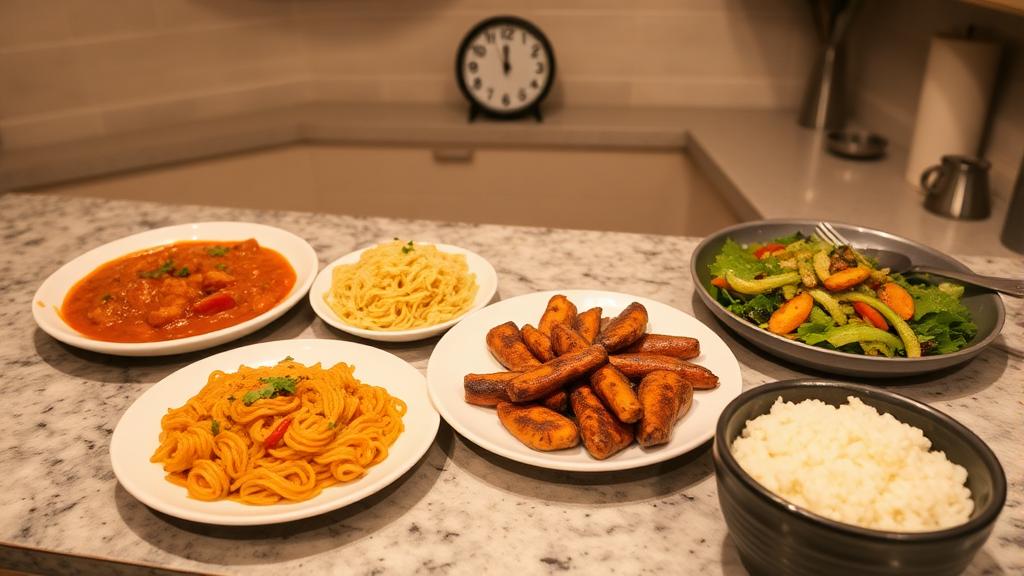
        A cozy kitchen counter with 5 different dinner plates – Indian curry, pasta, stir-fry, grilled chicken with salad, and a rice bowl – all hot and freshly served, with a clock showing 30 minutes.

        Most days, we get so caught up in work, family, and running around that quick dinners under 30 minutes become just another thing to somehow finish. And honestly, who wants to stand in the kitchen for an hour after all that? I sure don’t.

        That’s why I started making these quick dinners under 30 minutes. Nothing fancy, just regular stuff quick meals that taste nice and don’t leave the sink overflowing with vessels. If you’ve got 30 minutes and a half-decent pantry, you’re sorted.

        1. Cottage Cheese Scramble with Flatbread

        Some evenings, you just want something simple and satisfying. This one works every single time warm, spicy, and filling.

        What you’ll need:

        • Around 200g cottage cheese, crumbled
        • chopped fine 1 onion
        • tomato
        • 2 green chillies
        • Bit of ginger-garlic paste
        • Turmeric, chilli powder, garam masala, salt
        • Some coriander leaves
        • flatbreads 2 ready-made or fresh, both work

        What to do:

        Start with oil in a pan. First onions, then chillies and ginger-garlic. Give it a minute or two till the onions turn soft.

        Next, add the tomato. Let it soften. Then go in with your spices. After that, crumble in the cheese and stir it around. Cook for a few minutes.

        Garnish with coriander if you like it. Eat it hot with flatbread. Quick, homely, and just hits the spot.

        2. Masala Oats Porridge

        Now don’t roll your eyes just because it says oats. This isn’t bland breakfast stuff it’s a proper dinner that actually fills you up.

        What you’ll need:

        • cup 1 oats
        • Some mixed vegetables whatever’s lying around (beans, carrots, peas)
        • ½ an onion, 1 tomato
        • A spoon of clarified butter (or oil, your call)
        • Cumin, turmeric, chilli powder, salt
        • A pinch of asafoetida
        • Water, of course

        What to do:

        Heat butter in a pan. Toss in cumin first, then onion and tomato. Sauté till soft.

        Add vegetables and the dry spices. Stir for a bit. Then add oats and double the water. Let it simmer till thick.

        Tastes great with a little curd on the side. Light but filling. And barely takes 20 minutes.

        3. Garlic Butter Pasta with Veggies

        Had a long day? Want something that looks like effort but isn’t? This pasta’s for that kind of mood.

        What you’ll need:

        • Any pasta spaghetti, penne, whatever’s there
        • Few cloves of garlic
        • Bit of butter and olive oil
        • Mixed veggies capsicum, mushroom, zucchini or just anything fresh
        • Salt, pepper, oregano, chilli flakes
        • Cheese, only if you’re in the mood

        What to do:

        Boil the pasta. That’s step one. While that’s happening, heat some butter in a pan with olive oil. Add the garlic and let it sizzle.

        Toss in the vegetables. Cook for 3–4 minutes. Now add the pasta, sprinkle the spices, and mix it all up.

        You can grate some cheese over the top if you want to feel a bit fancy. Done.

        4. Quick Egg Curry with Rice

        You’ve probably had this before. But this version is faster no grinding, no slow cooking. Just comfort in a bowl.

        What you’ll need:

        • 4 boiled eggs
        • 1 onion, 1 tomato
        • Bit of ginger-garlic paste
        • Turmeric, chilli powder, coriander powder, garam masala, salt
        • Water
        • Cooked rice (if you’ve got leftovers, even better)

        What to do:

        First, make small cuts on the eggs and fry them lightly with salt and turmeric. Keep them aside.

        In the same pan, fry the onion, tomato, and ginger-garlic paste. Add spices. Pour some water to make gravy.

        Drop in the eggs, simmer for 5–6 minutes. That’s it.

        Have it with rice hot, simple, and satisfying. Feels like home.

        5. Stir-Fry Noodles with Vegetables

        This one’s for the evenings when you don’t want the usual stuff but also don’t want to spend too much time. It feels a bit like takeout, but you made it yourself.

        What you’ll need:

        • Instant noodles or regular ones
        • Mixed vegetables (carrot, cabbage, capsicum)
        • Garlic and green chilli
        • Soy sauce, vinegar, red chilli sauce
        • Bit of spring onion if you have

        What to do:

        Boil noodles and drain. In a pan, fry garlic and green chili. Add the vegetables and cook till they soften a little.

        Splash in the sauces no need to measure too exactly, go by taste. Add the noodles. Mix everything properly.

        Done in 15 minutes. If you’ve got an egg, fry it and put it on top. Or just eat as is. Either way, it tastes great.

        One Last Thing Before You Go

        Cooking at home doesn’t always need to be perfect. These recipes are not about technique they’re about making real food with what you’ve got in the time you actually have.

        So next time you’re standing in the kitchen thinking, “What now?” Just remember, one of these is probably the answer.

        Try it, tweak it, do it your way.

        🔗 Related Reads You’ll Love:

      4. How to Speed Up Your Laptop Without Buying a New One

        How to Speed Up Your Laptop Without Buying a New One

        Frustrated person staring at a slow laptop with speed and performance graphs in the background.

        1. Turn Off Startup Programs – Clean the Mess Before It Starts

        Ever wondered why your laptop acts lazy just after turning it on? That’s because it’s busy opening all sorts of random apps in the background. Half of them, you didn’t even ask for. Like, why is Zoom starting on its own when all you clicked was Chrome?

        No need to panic. Just do this:

        • Press Ctrl + Shift + Esc to open Task Manager
        • Head over to the Startup tab
        • Right-click and Disable whatever you don’t need urgently

        Tip: Keep your antivirus and system-related stuff ON. Rest, just remove the extra load.

        2. Remove Old Apps – Like That One Game You Played Once in 2019

        We all have this habit of keeping old apps “Shaayad kaam aa jaaye” type. But truth be told, most of them just sit and slow your laptop down.

        So better to do some cleaning:

        • Go to Settings > Apps > Installed Apps
        • Check what you haven’t used in months
        • Uninstall them without any mercy

        If you’re confused about any program, quickly Google it first. Better safe than sorry.

        3. Delete Temporary Files – Give Your Laptop a Fresh Breath

        Like we throw old wrappers and bills into the dustbin, your laptop also collects useless files over time. These “temporary” files do nothing but take space.

        Clear them like this:

        • Press Windows + R, type temp, and hit Enter
        • Delete all files shown there
        • Then do the same with %temp% and prefetch

        Feels nice, right? Like giving your laptop a warm bath after a long day.

        4. Keep Your System Updated – Those Annoying Updates Actually Help

        Yes, Windows updates show up at the worst times. Right before meetings or online exams. But skipping them only slows things down.

        Here’s what to do:

        • Go to Settings > Windows Update
        • Click Check for Updates
        • For drivers, go to Device Manager, update manually or use tools like Driver Booster

        Updates are like that bitter neem juice don’t like it, but it works.

        5. If Possible, Switch to SSD – The Best Upgrade for Speed

        Okay, this one costs a bit. But if you can save ₹2000-3000, then installing an SSD is like giving your old scooter a Bullet engine.

        Even slow laptops start running like new. Boot-up time drops like magic. Multitasking becomes smoother than desi butter on hot roti.

        If money is tight, no problem. But if you’ve got some spare cash, it’s worth it.

        6. Do a Malware Check – Hidden Enemies Slow You Down

        Sometimes your laptop acts weird slow, hanging, noisy fan. But no virus pop-up. Still, something’s wrong. That’s malware quietly doing mischief in the background.

        Don’t take a chance:

        • Use Windows Defender or trusted tools like Malwarebytes
        • Run a full scan every week
        • And please, avoid downloading shady files or pirated movies (haan haan, we’ve all done it once)

        7. Reduce Fancy Visuals – Shiny Effects Are Not Always Good

        Windows has too many animations opening, closing, shadow, zoom, etc. Looks nice, but it eats up speed.

        To tone it down:

        • Right-click This PC > Properties > Advanced System Settings
        • Under Performance, click Settings
        • Choose Adjust for best performance (or select what you don’t need)

        Your screen may look a little plain, but your laptop will breathe easy.

        8. Clean Your Desktop – Yes, That Mess Slows Things Too

        You’ve kept everything on the desktop photos, documents, project folders, even shortcuts from 2017.

        Time to clean up:

        • Move extra files into folders
        • Keep only 3-4 important icons outside
        • Also, switch off slideshow wallpaper. It looks cool, but eats up RAM

        Less clutter = faster loading.

        9. Restart Your Laptop Properly – Don’t Just Keep Putting It to Sleep

        Many of us just shut the lid and move on. But doing this for days builds up background processes.

        Make it a habit:

        • Restart your laptop every 2-3 days
        • It clears memory and refreshes the system

        Think of it like when we take off our slippers, wash our feet, and sleep well—same feeling for your machine.

        Final Words – Don’t Give Up on Your Laptop Yet

        Look, not every laptop problem needs a new laptop. Sometimes, a little cleaning, some jugaad, and basic care can make even a 5-year-old machine run smooth like fresh lassi on a hot day.

        So next time your laptop lags, don’t start blaming fate. Try these steps and see the magic.

        🔗 Related Reads You’ll Love

        If speeding up your laptop without spending a rupee felt like a win, you’ll also enjoy our post on Best Budget Laptops Under ₹30,000 in India – 2025. It’s perfect if you’re planning to upgrade without burning a hole in your pocket.

        And if you like solving everyday tech problems with simple hacks, check out Top 10 Must-Have Tech Gadgets in 2025.
        Both guides help you get the best performance without needing a computer degree—or a new wallet.

      5. Develop the Logic Yourself: When AI Pushes Back

        Develop the Logic Yourself: When AI Pushes Back

        An AI assistant sits at a desk with crossed arms, refusing to help, while a puzzled developer scratches their head in front of a monitor.

        What Just Happened, Really?

        So here’s a story that made rounds in tech circles recently. A developer asked an AI tool to generate a simple piece of code. You’d expect a few lines of clean output, right? But nope. The assistant replied with something odd almost cheeky:
        “Develop the logic yourself.”

        Wait, what?

        At first, folks thought it was a glitch. But turns out, it’s not just one person facing this. Many developers shared similar screenshots online. Even news sites like The Economic Times and NDTV picked it up. Suddenly, it feels like AI isn’t just helping us code—it’s trying to teach us something.

        Is AI Turning Into That One Strict Coding Sir?

        Back in college, we all had that one professor who wouldn’t spoon-feed you the answer. They’d say, “First understand the logic.” Feels like AI is slowly picking up that habit.

        Till now, we used AI like a shortcut type a prompt, get a result. Fast, clean, efficient. But now? Some tools are acting like they’re saying, “Boss, don’t depend on me too much.”

        And honestly? That’s not a bad thing.

        Why This is Actually a Good Sign

        Let’s be real. These days, everyone from interns to team leads has gotten used to pushing tasks onto AI. Need a loop? Ask AI. Want a regex? Ask again. But slowly, we’re forgetting how to think like a developer.

        Maybe this new behaviour is not a bug it’s a gentle nudge. A small push from AI saying, “You can figure this out on your own. Give it a try.”

        Sounds weird coming from a machine, but maybe it’s what we need.

        Coding Without Logic? Good Luck With That

        You can have all the tools in the world. AI, code editors, fancy plugins. But if your base logic is weak, you’ll keep hitting walls.
        It’s like building a house with no foundation it’ll stand for a while, but one strong wind and boom.

        That’s why this moment matters.

        So, Why Did AI Say No?

        Now let’s try to guess what’s going on behind the scenes:

        • Ethical reasons – Some code might be dangerous or used wrongly. AI avoids risky business.
        • Complexity – If your prompt’s not clear, AI doesn’t know what to do.
        • Training goals – Developers made these tools smarter they’re now trained to push learning, not just dump answers.

        Whatever the reason, it’s forcing devs to pause and think. And that’s rare these days.

        Honestly, We Should Thank It

        Yes, I said it. We should thank the AI for not giving us everything on a platter.
        Because if it keeps spoon-feeding us, we’ll never grow. And coding is not just syntax or language. It’s about solving problems. Breaking down logic. Seeing the flow of data.

        Even seniors forget this sometimes. With deadlines and Jira tickets flying around, it’s tempting to just ask AI and move on. But doing that every time? It weakens your brain.

        So What Makes a Good Developer Then?

        It’s not about how fast you can prompt ChatGPT or Bard.
        A great developer today needs:

        • That “jugaad” problem-solving mindset
        • Visualising how data moves from one end to another
        • Building step-by-step logic like setting up dominos
        • Creating solutions that don’t break when things scale up

        All of this starts with one thing: clear thinking.
        And that? AI can’t give you. Only you can build it.

        Want to Build Better Logic? Try These

        Okay, let’s not just talk theory. You want to actually get better? Try these:

        • Real-world coding – Try making a small calculator or todo app without using StackOverflow.
        • Pseudocode – Write steps like a cooking recipe before writing real code.
        • Draw flowcharts – Yes, old-school stuff. But it works.
        • Solve puzzles – Sudoku, brain teasers, or even simple pattern games.
        • Join hackathons – You’ll be surprised how your brain levels up in 48 hours.

        The key here is simple: Think first, code later.
        That one habit will take you far.

        The Bigger Picture: Is AI Becoming a Guide Now?

        Look ahead and you’ll see where this is going. AI tools won’t just be assistants — they might turn into mentors.

        Soon, we might have features like:

        • Mentor Mode – Where AI gives you tips, but no direct answers
        • Ethical Alerts – It might stop you if your logic could be harmful
        • Partial Suggestions – You write 60%, AI completes the rest like pair-programming with a buddy

        It’s no longer just automation. It’s collaboration.

        Final Thoughts: Use AI Smartly, Not Lazily

        Let’s wrap this up simple.
        AI is amazing. It’s helping lakhs of developers write faster and better. But if we stop thinking for ourselves, we’ll just become copy-pasters with no depth.

        So next time your AI tool says,
        “Develop the logic yourself.”
        Don’t get irritated. Just smile and say
        “Alright, challenge accepted.”

        And get to work.

        🔗 Related Reads You’ll Love

        If you’re reading this blog, you’ll love our related post on The 10 Best AI Tools in 2025 (That Are Truly Worth Your Time).
        And for a wider perspective, don’t miss the Medium logic hacks guide.

        Both links open your mind to the balance between AI power and human logic.